Integrasi Pengiriman Notifikasi WhatsApp di AlurKerja
Di AlurKerja, Anda dapat mengirimkan notifikasi melalui WhatsApp dengan memanfaatkan integrasi BPMN. Dengan konfigurasi ini, user bisa memastikan notifikasi cepat sampai ke penerima melalui platform yang lebih praktis.
1. Membuat BPMN & Form
Langkah pertama adalah menyiapkan diagram BPMN beserta form yang diperlukan.
Form ini akan menjadi sumber data untuk memicu notifikasi WhatsApp, misalnya untuk approval, status transaksi, atau pengingat tugas.
2. Menentukan Posisi Notifikasi WhatsApp di BPMN
User dapat menentukan di mana notifikasi WhatsApp akan dikirimkan dalam diagram BPMN.
| Posisi Notifikasi | Deskripsi |
|---|---|
| Flow | Notifikasi dikirim saat alur berpindah dari satu tahapan ke tahapan lain. |
| Event | Notifikasi dikirim ketika sebuah event (start, intermediate, atau end) terjadi. |
| Task | Notifikasi dikirim ketika sebuah task selesai atau sedang berjalan. |
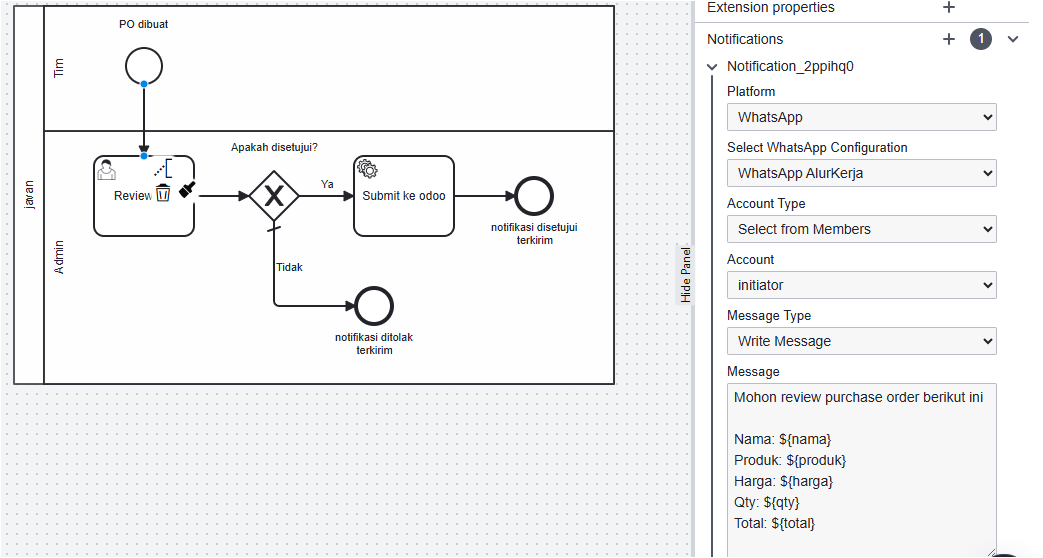
3. Mengisi Properti Notification (WhatsApp)
Pada elemen BPMN yang sudah dipilih, buka panel Properties → Notification lalu isi data berikut:
| Properti | Deskripsi |
|---|---|
| Platform | Pilih WhatsApp. |
| Select WhatsApp Configuration |
Pilih konfigurasi WhatsApp yang tersedia. Jika belum ada, buat terlebih dahulu di Menu Integrations → WhatsApp. Integrasi WhatsApp saat ini menggunakan watzap.id. Pastikan Anda sudah memiliki subscription aktif di platform tersebut. |
| Account Type |
Cara menentukan penerima pesan:
|
| Message Type |
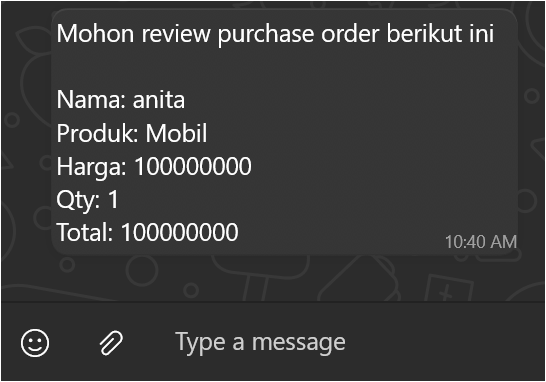
Menentukan isi pesan WhatsApp:
|
4. Menyimpan & Deploy BPMN
Setelah semua konfigurasi selesai, simpan perubahan diagram BPMN.
Kemudian lakukan deploy BPMN ke workflow engine agar workflow dengan notifikasi WhatsApp siap dijalankan di aplikasi.
Limitasi Integrasi WhatsApp di AlurKerja
-
Hanya mendukung integrasi WhatsApp melalui watzap.id.
-
Hanya dapat mengirim ke user yang terdaftar di workspace dan user tersebut sudah menambahkan nomor HP di profilnya.
-
Hanya dapat mengirim ke account individual, belum mendukung pengiriman ke grup WhatsApp.


Ready to Digitally Transform Your Business Processes?
Join 100+ companies already experiencing maximum productivity